


01
PROJECT
MIND RUN WITH OMNI
A mobile app prototype to enhance the experience of running utilizing voice data collection.
OVERVIEW
Challenge
There is a pro runner’s training tip that focuses on improving breathing, heart rate, endurance, and pace control. The training tip is to maintain a pace where one can walk/run and talk comfortably. Over time, the runner makes gradual improvements in all areas with very little thought or effort. However, it might be too easy that even beginners might think the progression is too slow. Beginners tend to push too hard and over-exertion is what leads to injury. Many claim running is boring. When the mind is bored, it focuses on the physical pain and discomfort. How can we combine the runner's training tip and maximize mental distraction from physical discomfort? How can we achieve this during a pandemic with COVID-19 when it is hard to find someone to run and talk with?
the Project mission
Find a unique way to introduce voice data collection that allows the runner to enter deep thought early on during a run to distract from physical discomfort.
Project Scope
Create basic UI that combines fitness tracking and voice data collection.
Tools
Miro, Balsamiq, Zoom
Role
Lead UX Designer
Duration
1 Week
Deliverable
Lo-Mid Fidelity
Design process
Discover
-
Validate assumptions
-
Competitive Analysis
- User Interviews
Define
-
Affinity mapping
-
Synthesis
-
Problem statement
-
Ideate
Develop
-
User flows
-
Sketch
-
Prototype & test


Deliver
-
Incorporate feedback
-
Polish
-
Deliver
Discover
Validation of Assumptions
Assumptions
1
2
3
Runners find running boring and painful.
Runners need deep thought to distract the mind from the physical pain of running.
Runners need a way to journal thoughts hands-free
Online Research
1
According to a scientific study, runners spent their time thinking about 3 things on a run.
32
%
focused on
PAIN & DISCOMFORT
40
%
focused on
pace & distance
28
%
focused on
environment
2
3
All assumptions require further validation needed from competitive analysis and user interviews. How has existing fitness tracking applications addressed this?
competitive Analysis


There is not a way to run or exercise without having to pull out your phone when you absolutely have to jot down an important thought, mental note, or memo. I looked into meditation applications and found nothing with voice data collection to enhance the hands-free experience while exercising.
User interviews
Questions
-
How often do you run per week? How far? How long does it take?
-
What do you think about while running?
-
Do you have any important thoughts?
-
How do you remember your important thoughts?
-
Do you use headphones? If yes, what are you listening to?
-
Are you familiar with the breathing tip to run and talk comfortably?
-
If so, how do you feel about it? Do you use it? Why or why not?
-
Do you use a fitness tracker while you run? If so, what app?
-
What metrics are important to you? Why?
-
How do you check your pace?
-
What are the benefits to deep thought? How do you enter that mental state?
-
How do you feel about running with your phone?
Users Interviewed
5
Runner Skill Level
Intermediate
Age Range
24-34
Avg Distance per Run
4.5 miles
Avg Frequency of Runs
4 Runs per Week
Run with Phone
5/5 Users
Define
Affinity Mapping

Research Synthesis

Key Insights
“I like to think about stuff to distract me from the act of running.”
“I remember thoughts by stopping and typing it in my phone. If I don’t, I just hope I remember it later.”
“I like to reflect during my run. The good, the bad in my life. Takes the mind off running.”
“Running is so boring. I only do it because it’s healthy.”
1
2
3
Runners dislike fiddling with phone during a run.
Runners need a way to take notes without stopping to pull out their phone.
Runners desire quality time in self-reflection or good conversation.
Runners need a simple way to invoke deep thoughts of self-reflection and save them hands-free because running and fiddling with a phone is a hassle.
Solution:
MIND RUN WITH OMNI
Provide users with an AI that engages in conversation at the very beginning of the run or activity. An interactive voice experience with an AI that provides prompts that incite deep self-reflection or a topic of the user’s choosing. By doing so, the user can enter deep thought sooner thus distracting the user from the run.
As an activity companion, it also functions as a mind journal. The AI, Omni, also transcribes the entire conversation. If the user has a question, Omni can search the internet for an answer and save the link in the transcription for later viewing.
Don't like talking to an AI?
Mind Run with Omni allows for a co-op solution. Users can see other runners looking for a friend to run with. Set a scheduled run with your partner, give her a call over voice chat, and Omni takes a backseat. Omni is still there in case a user has a question. Simply say "Hey Omni" and ask anything.
Key features

Engaging conversation with OMNI.
OMNI starts the exercise by reminding the runner her abilities and tells the runner to put away the cellphone.
OMNI speaks to the runner using encouraging terminology. Rather than addressing the user by "you" it chooses words like "we", "us", and "lets" suggesting the runner is not alone on this activity.
OMNI asks the runner open-ended questions that allow the runner to be engaged in thought and to speak openly. If the runner has a random question or epiphany during the run, OMNI can search the internet for relevant articles to be viewed later.
Giving the user the power to choose.
Upon opening the app, the runner may quickly choose the type of run and voice options: Solo or Co-Op.
During a Solo run, it can be a private journal event or brainstorming activity with the voice AI, OMNI, to take notes, ask deeper questions, or search the internet as the runner remains hands-free during exercise.
During a Co-Op run, the runner can connect voice chat with another runner to talk and run together while OMNI takes a backseat. OMNI can still transcribe the conversation and search the internet when prompted by "Hey OMNI."


Viewing results that's easy to understand.
After completing a run, the runner can view data that makes sense with placement and icons.
Runner can zoom on GPS map to view changes of pace and BPM on route. Distance ran, time elapsed, and calories burned are expected for fitness tracking and displayed.
The book icon labeled "Notes" will show the transcribed conversation between the runner and OMNI in Solo or the runner and another runner in Co-Op.
Review past conversations with OMNI
The runner can review past conversations with OMNI in text message form or playback audio. If the runner used OMNI to brainstorm, he or she can revisit that conversation. Any articles or links OMNI found related to a question or topic can be viewed and opened.
Mind Run with OMNI is meant to help runners multi-task by exercising also the mind and increase productivity.

Develop
Let's begin with how I came up with my solution.
After getting to know our users' pain points and defining the problem statement. I began to ideate about the user flow.
It must be simple to begin an activity and the runner is hands-free for the entirety of the activity.

Early sketch of the user flow for Mind Run with OMNI

Simplified user flow for Solo runs and Co-Op runs

User flow for viewing past results and transcribed conversations.


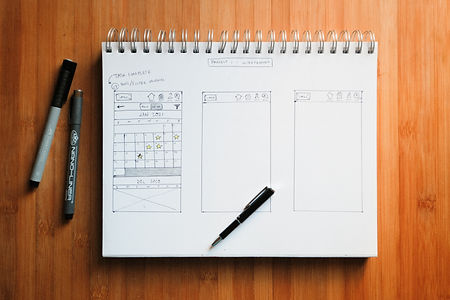
Initial sketches of the wireframes with pen and paper
Utilizing these sketched wireframes, I imported the images into Marvel to create a simple prototype to test on a handful of users.
The feedback received led to a handful of changes like Navigation placement moving to the bottom of the screen.
Deliver
Piecing it all together, I created lo-fidelity wireframes in Balsamiq implementing my user feedback. Beginning with a basic login screen, these show the user flow of a solo run.

Login Splash
Select Solo
Choose activity and Start
Test audio and microphone
Prompts & count down
Phone sleeps & begins activity

Tap screen to wake
Omni checks in & pause activity
Tap stop to complete run
Select View Results
Display metrics & select Notes
Read transcribed conversation
Go back to Home
The next set of wireframes demonstrates a user choosing co-op and finding a friend also looking for someone to run with. Once the users are finished running, they may end the call and view their results.

Select Co-Op
Drop down Friends List
Select friend to invite
Tap Send Invite
Waiting screen to connect
In-chat & both users tap Start
Prompts & count down

Phone sleeps, begins activity, tap to wake
Omni checks in & pause activity
Tap stop to complete run
Tap End Call to end conversation
Select View Results
Display metrics & select Notes
Read transcribed conversation
Considering that much of this application relies on a voice interactive AI, the only feedback I received was for the superficial design. However, the users I gathered feedback from were very eager to experience running with an AI companion. Many even reached out to me after finishing a run wishing they had Omni to bounce ideas off of.
As for the design itself, the users appreciated its simplicity and straightforward usability.
The most important wireframes are what happens during the blacked out screens. Imagine a voice AI asking a runner open-ended questions invoking deep thought on topics of choice. Runners would have the ability to journal mental thoughts hands-free on a run training both the mind and the body.
Next Steps
-
Explore open-ended questions for the AI to test on runners.
-
Conduct usability testing by pretending to be OMNI over the phone with runners.
-
Flesh out how users choose topics of discussion.
-
Users can program OMNI for different uses
-
Ex. Study partner - runner can use OMNI like studying flash cards
-
-
Explore how breathing can be listened to and turned into a metric.
View Other Work


Ancestoriesxr
In progress...
Discovering the "sweet spot" of consumer appeal in this business concept to combine ancestry and extended reality to deliver a unique and immersive user experience.


Redesigning Eco-Stylist's website in a way to bring personalization to their marketplace and find ways to add value to their customers' experience.


